Etunora - Google Slide Template for Modern Presentations
In today's fast-paced digital world, the ability to create compelling and professional presentations is essential for success. Whether you're pitching a new business idea, showcasing a product, or delivering educational content, the right tools can make all the difference. One such tool that stands out is the Etunora - Google Slide Template, a versatile and visually appealing solution designed for a wide range of presentation needs.
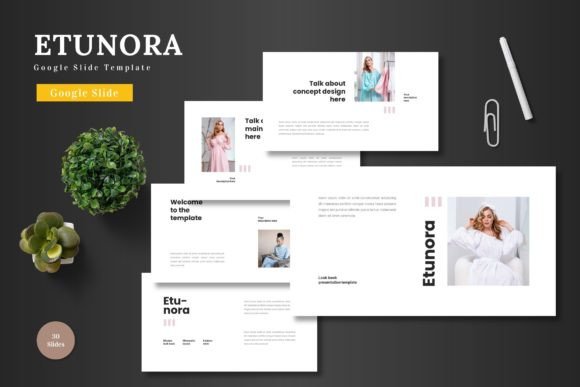
The Etunora - Google Slide Template offers a clean, scalable, and colorful design that can be adapted to suit various purposes. From business presentations to e-commerce pitches and product promotions, this template provides a solid foundation for creating engaging slides. Its multipurpose nature makes it an ideal choice for both professionals and individuals looking to elevate their presentation game without the need for complex software.
Key Features of Etunora - Google Slide Template
One of the most notable aspects of the Etunora - Google Slide Template is its comprehensive set of features. It includes 150 total slides, organized into five pre-made color schemes, each with 30 slides. This structure allows users to easily navigate through different sections of their presentation while maintaining a cohesive visual identity.
Additionally, the template includes section break slides, which help in organizing content logically and improving the flow of the presentation. The presence of 5 color variations ensures that users can choose a palette that aligns with their brand or personal style. This flexibility is particularly useful for businesses that want to maintain a consistent look across multiple presentations.
A standout feature of the Etunora - Google Slide Template is the handcrafted infographic based on master slides. This element adds a layer of visual interest and helps convey complex information in an accessible manner. The infographics are not only aesthetically pleasing but also highly functional, making them ideal for data-driven presentations.
Design and Customization Options
The Etunora - Google Slide Template is built with user-friendly customization in mind. All elements are editable directly within Google Slides, eliminating the need for additional software. Users can input their content, replace images in placeholders, and adjust colors to match their specific requirements. This level of control empowers creators to tailor their presentations without technical barriers.
The template also includes pixel-perfect illustrations that are fully resizable and editable. These graphics enhance the visual appeal of the slides while ensuring they remain sharp and clear at any size. This attention to detail is crucial for maintaining a professional appearance, especially when presenting to clients or stakeholders.
Another valuable aspect of the Etunora - Google Slide Template is the inclusion of picture placeholders, drag-and-drop galleries, and portfolio slides. These features allow users to showcase their work or products effectively. For instance, a photographer might use the gallery slide to display their portfolio, while a product designer could highlight their latest creations on a dedicated slide.
Practical Applications and Use Cases
The versatility of the Etunora - Google Slide Template makes it suitable for a wide array of applications. In a business context, it can serve as a pitch deck for startups or entrepreneurs seeking funding. The clean layout and professional design help convey ideas clearly and confidently, increasing the chances of securing investment or partnerships.
For e-commerce businesses, the template can be used to create compelling product presentations. With customizable slides and high-quality visuals, it’s easy to showcase products in an attractive and informative way. This can significantly enhance customer engagement and drive sales, especially when used in online marketing campaigns or social media posts.
Educators and researchers can also benefit from the Etunora - Google Slide Template. Its structured approach and visual elements make it ideal for delivering lectures, presenting research findings, or sharing educational content. The ability to include infographics and other graphical elements helps simplify complex topics and improve audience understanding.
Benefits of Using Etunora - Google Slide Template
One of the primary advantages of the Etunora - Google Slide Template is its ease of use. Since it operates entirely within Google Slides, users don’t need to learn a new software or invest in additional tools. This accessibility makes it an excellent choice for individuals who may not have extensive design experience but still want to create high-quality presentations.
Moreover, the template’s animated slides add an extra layer of engagement. These animations can be used strategically to highlight key points, transition between sections, or draw attention to important information. When used effectively, they can enhance the overall impact of the presentation and keep the audience more engaged.
Another significant benefit is the availability of multiple file formats. The Etunora - Google Slide Template includes 5 PPTX files, each with a widescreen format and 5 color schemes. This variety ensures that users can select the best option for their specific needs, whether they’re preparing a presentation for a conference, a classroom, or a virtual meeting.
Considerations and Best Practices
While the Etunora - Google Slide Template offers numerous advantages, it’s important to consider a few best practices to maximize its effectiveness. First, users should take the time to familiarize themselves with the template’s structure and features before starting their presentation. This will help avoid confusion and ensure a smoother workflow.
Additionally, it’s recommended to focus on content quality rather than relying solely on the template’s design. While the template provides a strong visual foundation, the message being conveyed is just as important. Clear, concise, and well-organized content will always resonate more with the audience than a visually impressive but poorly structured presentation.
Finally, users should take advantage of the template’s customization options to reflect their unique style or brand identity. Personalizing the template can help differentiate a presentation from others and leave a lasting impression on the audience.
In conclusion, the Etunora - Google Slide Template is a powerful tool for anyone looking to create professional and engaging presentations. With its comprehensive features, user-friendly design, and wide range of applications, it’s an excellent choice for businesses, educators, creators, and individuals alike. By leveraging its capabilities effectively, users can elevate their presentations and communicate their ideas more effectively in today’s competitive landscape.