Suleva - Google Slide Template
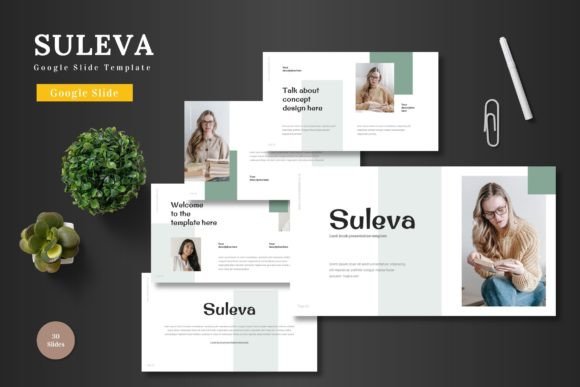
If you're looking for a professional, flexible, and visually appealing way to present your ideas, Suleva - Google Slide Template is a powerful tool that can elevate your presentations. Designed with versatility in mind, this template offers a clean, scalable, and colorful design that's perfect for a wide range of purposes—from business pitches to product promotions and more.
What Makes Suleva Stand Out
Suleva - Google Slide Template is more than just a collection of slides; it's a complete solution for anyone who wants to create stunning presentations without the hassle of complex software. The template comes with 150 total slides, divided into five sections, each with 30 slides. This structure ensures that you have enough space to cover all aspects of your presentation, whether it's a marketing pitch, a project update, or an educational session.
One of the standout features of Suleva is its five pre-made color schemes. These options allow you to match your brand colors or choose a look that aligns with your presentation’s theme. Additionally, each template includes 5 color variations, giving you even more flexibility to customize your slides without needing to use external tools.
Key Features You’ll Love
The Suleva template is packed with features that make it a top choice for professionals and creatives alike. For starters, every element on the slides is fully editable directly within Google Slides. This means you can change text, replace images, adjust colors, and even tweak animations—all without leaving the platform.
Another notable feature is the inclusion of animated slides. These animations add a dynamic touch to your presentation, helping to keep your audience engaged and focused on your message. Whether you're presenting to a small team or a large group, these animations can help emphasize key points and maintain interest throughout your talk.
The template also includes handcrafted infographics, which are perfect for visual storytelling. These graphics are based on master slides, ensuring consistency across your entire presentation. Plus, all the graphics are resizable and editable, so you can adapt them to fit your specific needs.
Practical Applications Across Industries
Suleva - Google Slide Template is incredibly versatile and can be used in various settings. For businesses, it's ideal for creating pitch decks that impress investors or clients. Its clean layout and professional design make it easy to convey your message clearly and effectively.
For e-commerce and product promotion, the template offers dedicated slides for showcasing products, including gallery and portfolio layouts. This makes it simple to display your offerings in an organized and visually appealing way. Whether you're launching a new product or promoting a sale, Suleva helps you tell your story with style.
Educators and trainers can also benefit from using Suleva. The template's structured layout allows for clear organization of content, making it easier to deliver lectures, training sessions, or workshops. The customizable slides ensure that you can tailor your materials to suit different learning styles and classroom environments.
Why Choose Suleva?
When it comes to choosing a Google Slide template, usability and efficiency are key. Suleva excels in both areas. Its user-friendly interface means that even those with limited design experience can create high-quality presentations. The drag-and-drop functionality for images and other elements makes the process quick and intuitive.
From a branding perspective, Suleva allows for consistent visual identity across all your slides. This is especially important when representing your business or personal brand. The ability to adjust colors and fonts directly within Google Slides ensures that your presentation looks polished and professional.
Getting Started with Suleva
Using Suleva - Google Slide Template is straightforward. The main file includes five PPTX files, each with a widescreen format and a different color scheme. This gives you a solid starting point for your presentation. Additionally, a readme file provides instructions on how to use the template, making it easy to get up and running quickly.
Before you begin, consider your presentation goals. Are you aiming to inform, persuade, or entertain? Understanding your purpose will help you select the right slides and customize them effectively. For example, if you're creating a marketing pitch, focus on the slides that highlight your value proposition and include compelling visuals.
Real-World Use Cases
Let’s say you’re an entrepreneur preparing a pitch for a new app. Using Suleva, you can create a slide deck that showcases your product’s features, target market, and unique selling points. The template’s clean design ensures that your message is clear, while the animated slides help to draw attention to key details.
For a creative professional, such as a graphic designer or photographer, Suleva offers a great way to present a portfolio. The gallery and portfolio slides allow you to showcase your work in a structured and visually appealing manner. This can be especially useful when pitching to potential clients or sharing your work on social media.
Final Thoughts
Suleva - Google Slide Template is a valuable resource for anyone looking to create impactful presentations. Its combination of design, functionality, and flexibility makes it suitable for a wide range of applications. Whether you're a business owner, educator, marketer, or creative professional, Suleva can help you communicate your ideas with clarity and confidence.
By choosing Suleva, you're not just getting a template—you're investing in a tool that can enhance your productivity, improve your communication, and support your professional growth. With its user-friendly design and comprehensive features, it's no wonder that Suleva is a popular choice among professionals and creators alike.