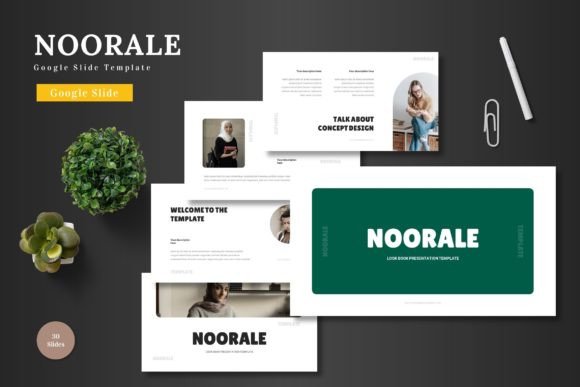
Noorale - Google Slide Template: A Versatile Presentation Tool
The Noorale - Google Slide Template is a comprehensive and visually appealing presentation tool designed to meet a wide range of business and personal needs. With its clean design, scalability, and color variety, it offers users a flexible platform for creating professional slides that can be used in various contexts such as business presentations, pitch decks, e-commerce campaigns, or product promotions.
One of the key advantages of this template is its ease of use. All elements are editable directly within Google Slides, eliminating the need for additional software. This makes it an ideal choice for users who want to customize their presentations without technical barriers. From inputting content to replacing images in placeholders and adjusting colors, the process is straightforward and intuitive.
Key Features of Noorale - Google Slide Template
The Noorale template includes 150 total slides divided into five sections, each with 30 slides. This structure allows for a well-organized flow, making it suitable for long presentations. Additionally, the template features slide break slides, which help in structuring the content effectively and maintaining audience engagement.
A notable feature is the inclusion of 5 color variations, allowing users to choose a theme that best suits their brand or message. The handcrafted infographic, based on master slides, adds a professional touch and enhances visual storytelling. Pixel-perfect illustrations ensure that every element looks polished and cohesive.
All graphics are resizable and editable, providing flexibility in design. The presence of picture placeholders, drag-and-drop galleries, and portfolio slides further enhances usability, making it easy to incorporate visual content seamlessly.
When Noorale is a Strong Fit
The Noorale template is particularly beneficial for individuals or businesses looking to create dynamic and engaging presentations quickly. Its multipurpose nature makes it suitable for a variety of industries, including startups, marketing teams, and e-commerce ventures. The animated slides included add a layer of interactivity, helping to capture and maintain the audience's attention.
For those who value time efficiency, the template’s pre-designed elements save the effort of starting from scratch. It is also ideal for users who may not have advanced design skills but still want to produce high-quality presentations. The availability of 5 PPTX files in widescreen format ensures compatibility across different platforms and devices.
Considerations and Tradeoffs
While the Noorale template offers many benefits, it is important to consider potential tradeoffs. For instance, the template may not offer the same level of customization as a fully designed PowerPoint file created from scratch. Users who require highly specific branding elements may find that some adjustments are necessary to align the template with their unique identity.
Additionally, the template’s reliance on Google Slides means that users must have access to this platform and be comfortable navigating its interface. Those unfamiliar with Google Slides may need to spend some time learning how to make the most of the template’s features.
Alternatives Worth Considering
There are other Google Slide templates available that may better suit certain needs. For example, users who prefer more minimalist designs might explore alternatives that focus on simplicity and clarity. Similarly, those requiring highly specialized templates for niche industries may find other options more appropriate.
It is also worth noting that some users may prefer templates that offer more advanced animation features or deeper integration with other tools. In such cases, evaluating alternative templates could lead to a better fit for specific project requirements.
Practical Decision-Making Insights
When deciding whether to use the Noorale - Google Slide Template, it is essential to assess your specific goals and needs. Consider the type of presentation you will be creating, the level of customization required, and your familiarity with Google Slides. If your primary goal is to create a professional and visually appealing presentation quickly, Noorale is a strong contender.
However, if you require a highly tailored solution or have complex design needs, you may need to explore other options. It is also advisable to review user feedback and examples of presentations created with the Noorale template to get a better sense of its capabilities and limitations.
In summary, the Noorale - Google Slide Template provides a practical and efficient solution for creating high-quality presentations. Its combination of design, functionality, and ease of use makes it a valuable resource for both personal and professional projects. By carefully evaluating your needs and considering the available options, you can determine whether this template aligns with your goals and helps you achieve your presentation objectives.